




Anteprima



- Steam
- Tutto il mondo
- interfaccia, sottotitoli
- 17 giu 2024
Blade and Sorcery
Steam
Tutto il mondo
Chiave digitale
Prezzo in arrivo
Chiave per PC
- Chiave rivelata nella pagina dell'ordine non appena il pagamento è confermato
- Paga in BTC, USDT, USDC, ETH, SOL e altre
- Sostituita o rimborsata se non funziona
Informazioni sul gioco
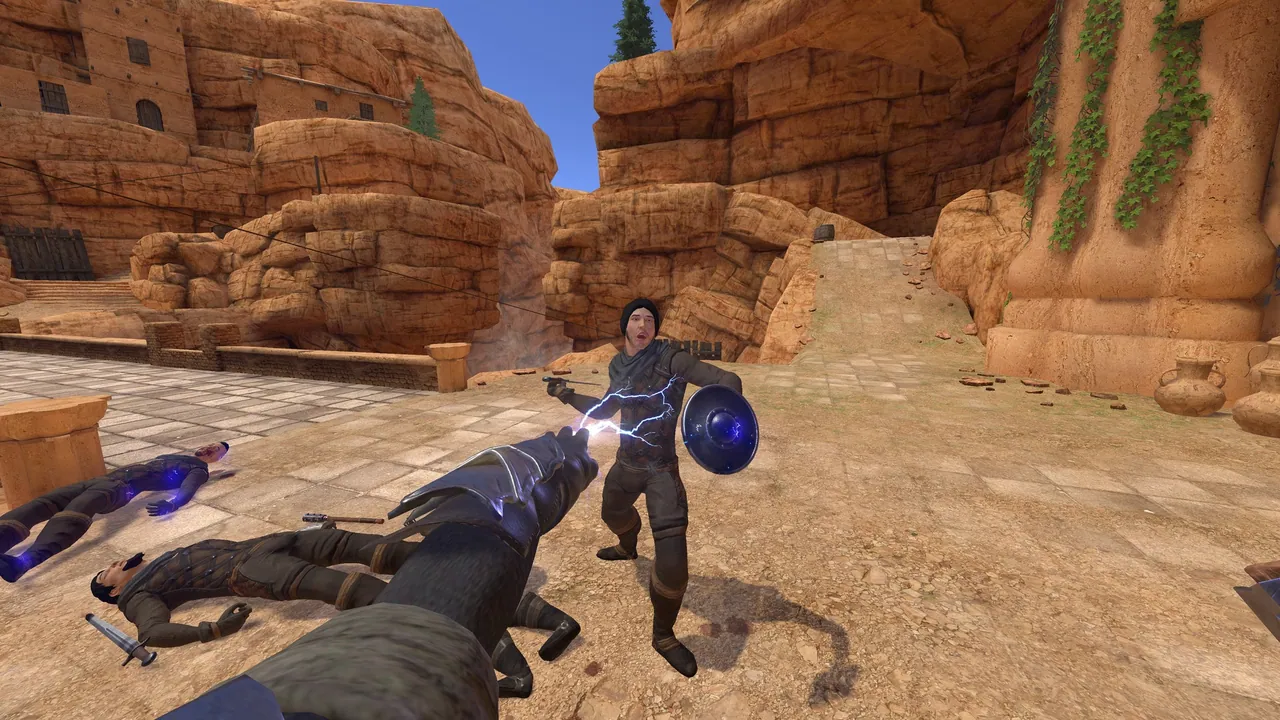
Blade & Sorcery is a medieval fantasy like no other, focusing on melee, ranged and magic combat that fully utilizes a unique and realistic physics driven interaction and combat system.
Built exclusively for VR, collisions are dictated by fine hitboxes, objects have weight and follow the laws of physics, creatures have full body physics and presence, and blades can be used to penetrate soft materials or deflect magic.
Embark on an adventure in Crystal Hunt progression mode, with 78 skills to unlock. Explore the dungeons and dive into the deep lore of Byeth to uncover the secrets of the ancient Dalgarians.
Play in unrestricted sandbox mode to access all 76 weapons, 90 armour pieces, and enable any skill you desire.
In Blade & Sorcery, the combat is limited only by your own creativity. Choose your weapon, choose your stance, choose your fighting style; Be the powerful warrior, ranger or sorcerer you always dreamed of becoming!
Giocatore singoloAchievement di SteamCondivisione familiareSolo VR
Scheda tecnica
- WarpFrog
- WarpFrog
- 17 giugno 2024
- Azione, Avventura, Indies, RPG
- 10 lingue
- Steam
- Steam
- Tutto il mondo
Lingue nel dettaglio
| Interfaccia | Audio | Sottotitoli | |
|---|---|---|---|
| English | · | ||
| French | · | ||
| German | · | ||
| Italian | · | ||
| Japanese | · | ||
| Portuguese (Brazil) | · | ||
| Chinese (Simplified) | · | ||
| Spanish | · | ||
| Thai | · | ||
| Chinese (Traditional) | · |
Requisiti di sistema
| Minimo | Consigliati | |
|---|---|---|
| Sistema operativo | Windows 10 | Windows 10 |
| Processore | Quad Core 3GHz | 8-16 Core 4GHz |
| Memoria | 8 GB RAM | 16 GB RAM |
| Scheda video | NVIDIA GTX 1070 | NVIDIA RTX 2070 |
| Supporto VR | SteamVR or Oculus PCVR. Standing or Room Scale | SteamVR or Oculus PCVR. Standing or Room Scale |
| Note aggiuntive | Minimum 72Hz VR support | Recommended VR 90Hz support |
Attivazione
Attiva su Steam
- 1Installa Steam e accedi
- 2Menu Giochi › Attiva un prodotto su Steam
- 3Incolla la chiave rivelata nella pagina dell'ordine
- 4Il gioco appare nella tua libreria: scaricalo
Utilizzabile in tutti i paesi.
Non usare una VPN durante l'attivazione.
Guida dettagliata
Recensioni Steam
Estremamente positiva
Recensioni dei clienti Crypto2Key
Prodotti simili
Vedi tutto →


Prezzo in arrivo